Your main FREDA workspace.
Access the hosted platform in a browser to ask questions, choose a jurisdiction, explore source libraries, and review Opportunity Watch and Policy Watch results alongside HUD waiver information.
FREDA, WHERE YOU WORK
Start with the hosted FREDA workspace. Explore browser access on your computer or phone, with a separate Windows companion preview below.
Access the hosted platform in a browser to ask questions, choose a jurisdiction, explore source libraries, and review Opportunity Watch and Policy Watch results alongside HUD waiver information.
Preview the separate Windows companion experience below. Installer availability is under review; no Windows installer is offered for download here.
When supported by your browser, add the hosted workspace to your device for convenient access. This online web app is not a native app-store download.
Work with FREDA wherever recovery takes you.
Choose web, desktop, or mobile access to fit your day. We’ll help you select the voice features, conversation history, and integrations that support your team’s needs. See browser-specific instructions before adding the workspace to your device.
Start online with your invitation. Browser installation is optional and still requires internet access and sign-in.
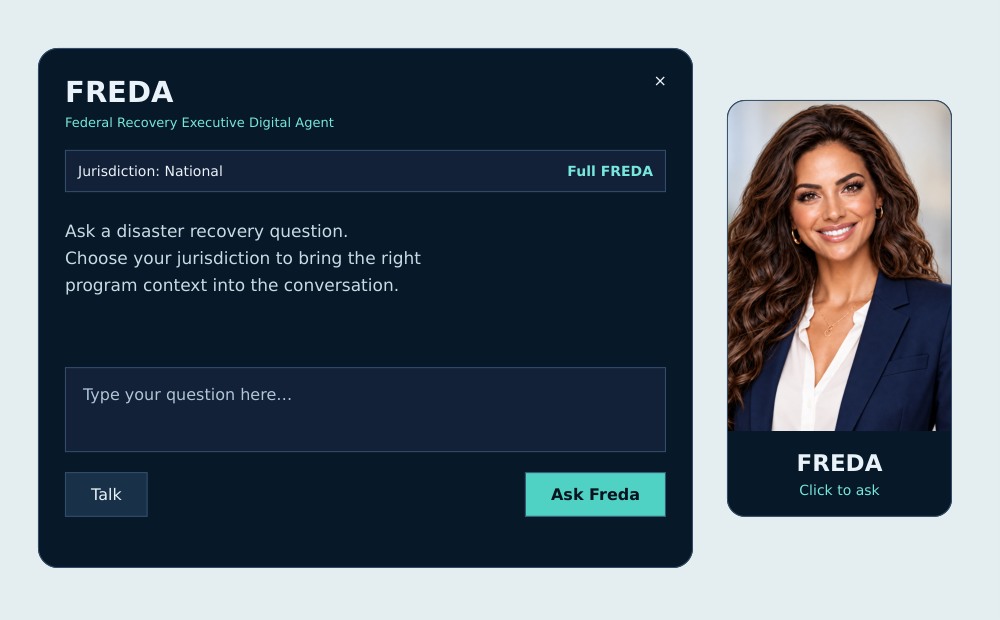
WINDOWS COMPANION PREVIEW
This is an illustrative preview. Windows companion installer availability is under review; no installer download is offered here.

Explore program questions in the full FREDA workspace, with a desktop companion close at hand. Bring your jurisdiction and recovery priorities into the conversation.
FREDA 3.3 interface preview with the Michael companion. View full-size image ↗